Financial
How to Submit a Purchase Order
- Start a New Purchase Order
a. Open Deltek Vision and sign in with your credentials
b. From the Navigation Bar, select “Purchase Order” and then click “New.”
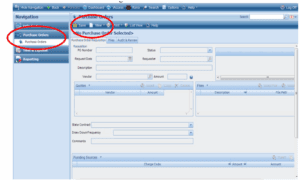
- Complete the Required Fields
Description – Provide a short summary of the purchase or expense (10 words or fewer).
Memo – Explain the need for this purchase or expense.
Vendor – Enter the vendor name (who the payment should go to).
Amount – Enter the total amount.
Quotes – Click insert and list quotes (vendor & amount), if applicable.
State Contract – Indicate if the purchase is under a state contract by selecting the contract.
Draw Down Frequency – If the purchase will be invoiced in increments, specify the billing schedule. - Upload Attachments
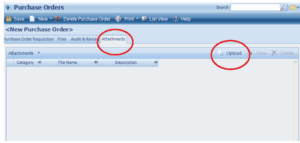
Go to the Attachments tab.
Click Upload (top right) to add quotes and/or other supporting documents.
In the category column, identify the attachment as a quote.
- Save and Submit
Click Save (top left).
Then click Submit (bottom of the page).
Once the purchase order is approved, you will receive an email notification confirming it is authorized for purchase.
If you don’t see the intended vendor or state contract in Deltek, please notify the Finance team at [email protected] so that it can be set up.
Submit an Expense Reimbursement
To submit a reimbursement for an expense, open and print the form below. Complete the form and submit it to the Finance and Operations Group.
Purchase and Use Outside Services
Please read all instructions below for purchasing procedures.
Purchase Orders
An approved Purchase Order (PO) is required before a purchase is made. This applies to all purchases except for in-state mileage costs. Purchase Orders are submitted and approved through Deltek. (How to Submit a Purchase Order.)
When a purchase is to be funded as a direct charge to a contract, the purchaser must check with the Finance and Operations group to ensure that funding for that specific purchase is included in the contract’s budget. A prior approval from the funding agency is required for all direct charge expenditures. The prior approval form must be completed by the Finance and Operations group, submitted to and approved by the funding agency, before the PO can be completed. Please allow two to three weeks for this process.
Purchase Limits and Approvals
- Purchases of $0–$9,999: If the item is purchased under a state contract, the state contract number should be included on the PO request. If a state contract is not used for the requested item, a minimum of three quotes is suggested for purchases of more than $250.
- Purchases of $10,000–$49,999: If the item is purchased under a state contract, the state contract number should be included on the PO request. If a state contract is not used for the requested item, the purchaser is required to obtain three quotes.
- Purchases of $50,000 or more: This level of expenditure is subject to Massachusetts Procurement Regulations, Chapter 30B, which require that the bid be advertised. MAPC provides assistance with this process. Consult with the Finance and Operations group for assistance.
Sales Tax
Boston Region MPO does not pay sales tax because it is a government entity and makes purchases using a tax-exemption certificate. A copy of the tax-exemption certificate can be obtained from the Finance and Operations group.
Invoice Approvals/Processing Payments to Vendors
To initiate payment for an invoice, follow the directions below.
- If you received the item in good order and the price is stated as quoted, forward the invoice to the Finance and Operations group with your approval.
- You are responsible for maintaining a file of all the paperwork received from the vendor regarding the purchase, including documentation of returns and credits. You should keep the file for one year, but longer than that if you know that it will be referenced again.
- If there are returns and credits involved in the purchase, or if there are problems with the vendor and you expect delays in submitting invoices/credits, notify the Finance and Operations group.You should resolve all problems involving the purchase before submitting the invoice and related documents for payment.
- If a problem arises after the invoice has been submitted, you should notify the Finance and Operations as soon as possible that there is a problem and that they should hold the payment, if possible. Once the problem has been resolved, you should inform the Finance and Operations Group so that payment can be made. Please note: Boston Region MPO policy is to pay vendors for satisfactory purchases when payment is due. Because of the volume of purchasing and the amount of time required to process most invoices, several weeks may pass between the day an invoice is forwarded to the Finance and Operations group and the day it is processed and a check is mailed by MAPC.
- If the purchase is time-sensitive (such as a conference registration, a purchase with a price deadline, or an advance travel request), you should inform the Finance and Operations group of the urgency, and work together to meet your timeline.
Make Direct Deposit Changes
Direct Deposit changes are processed through MAPC.
Send an email request to Delroy McDonald at [email protected] and Marybeth Boucher at [email protected] of your intention to change your direct deposit instructions.
You will receive a DocuSign form to complete with your requested changes.