Office
Use Common Phone Functions
How to Access The OfficeSuite Desktop App on Your Desktop for the First Time
From your desktop, log in to we.windstream.com
Log in with your username (CTPS Email Address)
Log in with your password
Select the Downloads tab
Download the OfficeSuite Desktop App
How to Login to the OfficeSuite Desktop App
Once the OfficeSuite Desktop app has been installed on your computer, select the WeConnect app installed on your computer and open it. Log in with the Windstream credentials that you created. The username is your CTPS email address. The password will be the password you assigned to your account.
Once you log in, select the phone icon on the top left-hand side of the app. This should prompt you to register your app and to set a PIN. Once you have completed those steps, your app will be active and ready to make and receive calls and access your voicemail.
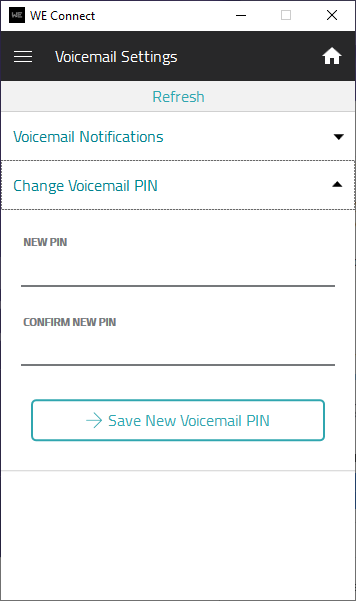
You will need to set a separate PIN for your voicemail. Select the menu at the top left-hand side of the app and select voicemail settings. Select Change Voicemail PIN and enter in your PIN and select save new voicemail PIN.
How to Access the We Connect OfficeSuite App on Your SmartPhone
You should have received an Email from Windstream inviting you to download the Windstream Mobile App. If you have received this email, please follow the following instructions if you wish to install the Windstream We Connect app on your smartphone.
If you want to download the app onto your smartphone, search for We Connect by Windstream in the play store on Android or the app store on iOS and download it to your computer.
Log in with your Windstream credentials.
Username (CTPS Email Address)
Password
Select the … button on the bottom right-hand side of the screen from the app and select OfficeSuite UC to use the softphone app on your smartphone.
How to Forward Your Calls to Your Cell Phone
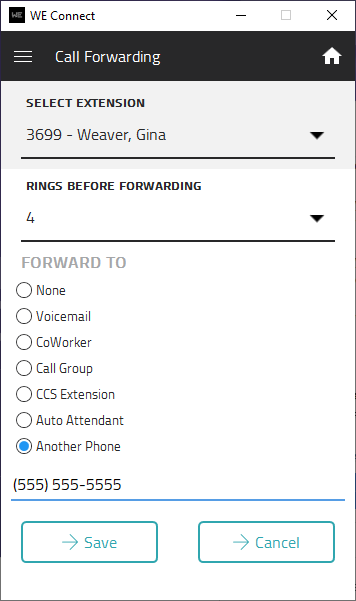
If you would like to forward your work phone to your cell phone, you can select My Call Forwarding under the menu at the top left-hand side of the app. Change the rings before forwarding to 4, select another phone, enter your phone number, and select save.
How to Access Phone Settings
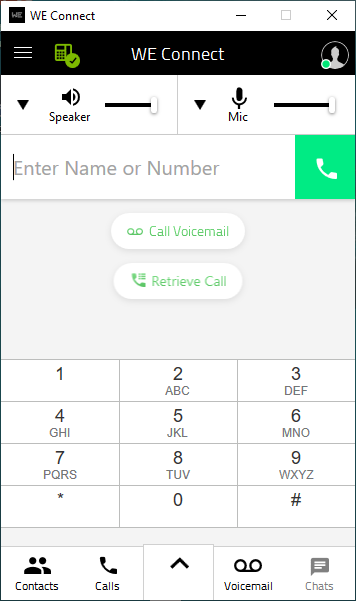
Select the dial pad button and select Call VoiceMail. When you call your VoiceMail, you can record your name for the dial-by-name directory from the main line. You can also change your voicemail message and change your PIN.
Travel Procedures
Please read and follow instructions when requesting travel or submitting reimbursements for travel. For travel policies, see Reimbursement for Travel, Conferences, and Meals under Administrative Policies of the MPO Staff Employee Handbook.
In-state Travel
For mileage and for other travel expenses paid for by an employee with his or her own money, the employee should use the Expense Reimbursement Form. The form must be completed within the next timesheet period if the employee wishes to be reimbursed. Reimbursement for in-state mileage, parking, and toll expenses does not require a purchase order (PO).
The Expense Reimbursement Form is for reimbursement of in-state mileage, parking, and toll expenses. Project-related mileage is reimbursed at a rate stipulated by the IRS, which can be obtained from the Finance and Operations group. The date, contract number, project number, origin, destination, and mileage, as well as expenses incurred for parking and tolls, should be recorded for each trip. If the trip included a series of destinations, they all must be listed. The employee needs to document the purpose of the trip in the section provided on the sheet.
The Other/Non-Mileage Expenses section of the Expense Reimbursement Form should be completed for expenses paid with the employee’s money. The employee needs to record the date of the expense, the grant/contract number, the Project number, a detailed description of the expense, and the cost.
The purchaser should complete the form as instructed. Click here to print a PDF of the Expense Reimbursement Form.
Out-of-state Travel
Approval Process
Travel to destinations outside of Massachusetts is charged directly to the contract that funds the work of the employee who is traveling, and it requires written prior approval from the funding agency. Because the usual purpose of out-of-state travel is attendance at a conference, many of the explanations below refer to conferences even though they could also apply to other out-of-state functions. The process for approval is described below.
Travel Budget
At the beginning of the annual budget process, the Finance team requests from each director a list of the staff who wishes to attend conferences and the estimated cost of each trip. The funding available for travel is constrained by the funding agencies. An employee cannot assume that a request for funding of travel will be approved. The travel budget will contain the funding available, and the Executive Director will decide which requests can be honored given the level of funding.
Prior Internal Approval by Administration
Staff must obtain prior approval before making any firm reservations.
Timeline:
- The Prior Approvals for Travel form must be completed in Deltek at least eight weeks before departure and four weeks before the early-bird registration deadline (if applicable).
- If these deadlines cannot be met, travelers must consult with the Director of Finance and Operations to determine whether the request can still be considered.
Requirements:
- The form should include as much cost information and documentation as possible, such as airfare, registration fees, and accommodations (including taxes).
- No reservations should be booked until the funding agency has given written approval.
- Detailed instructions for completing the form are available here.
Once the form is completed, a member of the Finance and Operations Group will submit the package for prior written approval from the funding agency.
Prior Approval from the Funding Agency
The Finance team submits the prior approval request from the funding agency, using the information provided by the prospective traveler in the Prior Approval for Travel Costs form. The traveler is notified and can proceed with making reservations after the request is approved by the funding agency.
Approved Allowances for Travel Expenses
The following are the contractually allowed categories of travel expenditures (a receipt for each travel expenditure is required for reimbursement). Reimbursements for all travel expenditures will be made after the travel is completed.
Conference or Training Registration Expenses
Registration expenses are reimbursable at 100 percent of the advertised cost. If there is a discount for early registration, it is encouraged that the traveler obtain all necessary approvals in time to meet the deadline for receiving the discount.
Hotel Accommodations
The cost of hotel accommodations is subject to contractual limitations. Please see a member of the Finance and Operations group for more specific details. This cost is reimbursable at 100 percent of the actual cost, not including tips or any non-accommodation-related expense. The traveler must obtain three hotel rate quotes, asking for government (General Services Administration) rates, when available, and provide an explanation if he or she requests approval for staying at a hotel that is not the least expensive in the vicinity of the conference. For example, if the three hotels are all in approximately the same location and vary in price minimally, the traveler may request the conference hotel for convenience and networking opportunities.
Airfare
The cost of airfare is reimbursable at 100 percent of coach fare. The traveler must research the least expensive airfare. When more than one airport may be used, a comparison in fares to each airport must be included on the Prior Approval for Travel Costs form.
Ground Travel
Ground travel includes a shuttle, mass transit, or taxi or ride sharing fare (if a shuttle or mass transit is unavailable) to get from the destination airport to the hotel and back again. If the hotel is not within walking distance of the conference, the cost of travel between the hotel and conference is also covered.
Mileage
If an employee chooses to drive, they must use a personal vehicle, not a rental vehicle, and mileage is reimbursed at the contractual rate.
Meals
Meals are reimbursed at 100 percent of the actual costs (up to the limit set by the contractor), not including tips or alcohol. Meal reimbursement limits are set by the contractor and listed on the form in Deltek.
Other Purchases
If unplanned and allowable expenditures arise during the trip, authorization can be requested by emailing the Finance team at [email protected] and requesting a Purchase Order. Immediately upon the traveler’s return, the receipts for these expenditures and a completed Expense Reimbursement form must be submitted to the Finance team for reimbursement.
Documentation of Expenditures
Upon returning to Boston MPO, and within the next timesheet period, the traveler must complete an Expense Reimbursement form and submit receipts of all expenditures to [email protected]. The documentation should include receipts for each meal; plane, train, and bus fares; hotel and registration fees; and any other allowable expenditures. The employee will not be reimbursed for expenses for which a receipt is not provided.
Timesheet(s)
The same contract number or numbers must appear on each Expense Reimbursement form, the traveler’s timesheet(s), and the Prior Approval for Travel Costs form.
Report Back After a Conference
When your time and attendance at a conference, national convening, or notable large professional development opportunity are funded through the agency, there is an expectation that you will report back on your experience and learnings so that the rest of the agency can benefit from it.
These report-outs can take a variety of forms such as a blog post, write-up for your supervisor, presentation for your team, or a presentation for the whole staff. Before you depart for any such opportunity, you should come to an agreement with your supervisor on what your reporting will look like and set a due date.

Find information about Reimbursement for Travel, Conferences and Meals as well as Travel Procedures in other sections of the intranet.
Reserve a Zipcar Through the Agency’s Business Account
In addition to mileage reimbursement, the agency offers a Zipcar business account membership for project-related meetings, fieldwork, public engagement events, or other work-related travel. The organization maintains a business account with Zipcar for this purpose. This account is strictly for business use; personal use is not permitted.
To set up your membership under this business account, please review, sign, and submit the Zipcar User Agreement (PDF) to [email protected]. This agreement outlines the organization’s policies and requirements for establishing and maintaining your Zipcar account.
Once your user agreement is processed, the HR and Operations Coordinator will email you an invitation to join the agency’s Zipcar Business Account. Zipcar will provide instructions on setting up your account, which will include uploading a copy of your driver’s license and other personal information. Once approved, you will receive your Zipcard within two weeks. The Zipcard allows you to access and unlock reserved vehicles. You may also use the Zipcar app for this purpose.
In addition to the cost of Zipcar membership and standard driving rates, other fees and charges may apply. Please review the Zipcar website to familiarize yourself with your obligations, including information on late fees. For example, you must return the car with at least ¼ filled gas tank. A gas card is provided in the driver’s side visor.
Once the user agreement is signed, the Zipcar rules and regulations are reviewed, and your account is set up, you can reserve a vehicle by following these steps:
- Get a quote: Obtain a cost estimate for your specific reservation from the Zipcar website.
- Submit a Request for Purchase Order (PO): In Deltek, submit a PO request for each reservation. Instructions on submitting POs are in the How To section of the Intranet. Include a description, estimated cost, and the project number. Your PO will need approvals from your supervisor, the finance team, and the Executive Director. These approvals will be processed through Deltek. This step ensures the finance team has the necessary information to reconcile Zipcar charges with the organization’s credit card statement. Allow 3-5 business days to receive approval after submitting your PO.
- Reserve Your Zipcar: Once you receive email approval of your PO through Deltek, you can secure your Zipcar through the Zipcar website or the app.
On the day of the reservation, locate your car, complete your business travel, and return the car to the specified location. After your trip, the invoice will be sent directly to the finance team for payment.
If you have any questions or need assistance regarding this process, please contact a member of the Finance and Operations group at [email protected].