State Transportation Building
BlueBikes New Member Sign Up Instructions
Welcome to Bluebikes! As an MAPC/Boston Region MPO employee, you are eligible for a corporate membership to the Bluebikes public bike share system. This is an annual membership that costs you $45 per year, not including usage fees that may be charged for trips longer than 45 minutes. Boston Region MPO pays the other half of the annual fee for you ($45). To sign up for the program, please follow the directions below:
1. Visit https://www.bluebikes.com/ and click “Join” in the upper right-hand corner.
2. Under the Membership types, click “I’m eligible for a Group/Corporate Discount”

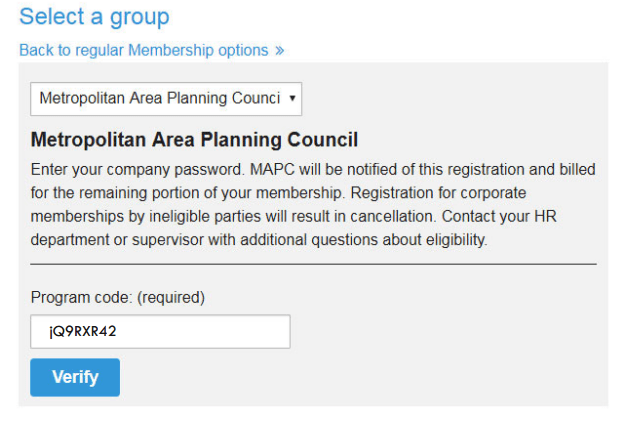
3. From the drop-down menu, select Metropolitan Area Planning Council as your group. MAPC has a Silver membership. The program code is jQ9RXR42. Once you enter the program code, click “verify.”
4. Fill out your information, including how you would like to receive your bike key. Please review the Liability Waiver and Rental Agreement and certify that you have read and agreed to the conditions. Please note that a Visa or MasterCard is required to complete your membership sign up. This card will be kept on file for any usage fees incurred by you during your membership period.
5. When you are finished, click the subscribe button to complete the sign-up process. Your Bluebikes membership key should arrive in the mail within 10 business days. Your annual membership will begin on the date that you activate your key.
6. Be sure to download the Bluebikes app for your phone as well.
For any questions or problems with the sign-up process, please contact Bluebikes Customer Service at:
Phone: 1-855-948-2929/ 24 hours per day, 7 days per week
www.bluebikes.com
Reserve a Parking Pass
Parking Pass Guidelines and Instructions
CTPS provides a limited number of parking passes (9 total) for use at the City Place Garage located beneath the State Transportation Building. The garage is open 24 hours a day, 7 days a week.
Parking passes are intended primarily to support you in attending work-related events that are not easily accessible by public transit or that require transporting presentation materials or equipment. When passes are not in use for work purposes, you may use them for personal reasons, subject to the guidelines below.
You will find Instructions for reserving and canceling a pass at the bottom of this page.
There are two types of passes available:
- 12-hour passes are valid from 6:00 AM to 6:00 PM, Monday through Friday. Overnight parking is not allowed. If a vehicle remains in the garage after 6:00 PM, a charge will be incurred.
- 24-hour passes are valid for a full calendar day, including weekends and holidays. Overnight parking is permitted with this pass.
Work-related uses take priority and may be booked up to four weeks in advance. Personal reservations can be made up to two weeks in advance, with a limit of two personal reservations per user per week (regardless of pass type).
Rules and Expectations
- You should reserve and use the pass yourself. Passes are non-transferable, and reserving one for someone else is strictly prohibited. Doing so may result in the loss of parking privileges for both you and the other person.
- Please return the pass to the metal container next to the postage meter at the end of your reserved day. You may keep the pass overnight only if you have reserved it for the next day.
- Returning the pass on time ensures it’s available for others. If the pass is not returned promptly, you may be responsible for any related parking charges.
- If your reserved pass isn’t available when you arrive, please park in the garage and try to reserve another pass. Parking on the street is not recommended, as parking tickets will not be reimbursed.
- Even if no one has reserved the pass for the next day, it should be returned in the metal container each time you use it.
- The garage allows up to 10 minutes of free parking to give you time to pick up or return passes. Under no circumstances should the parking pass be taken home by the current day’s user unless reserved for the next day.
How to Reserve a Pass
- Go to the Parking Passes page to access the reservation system.
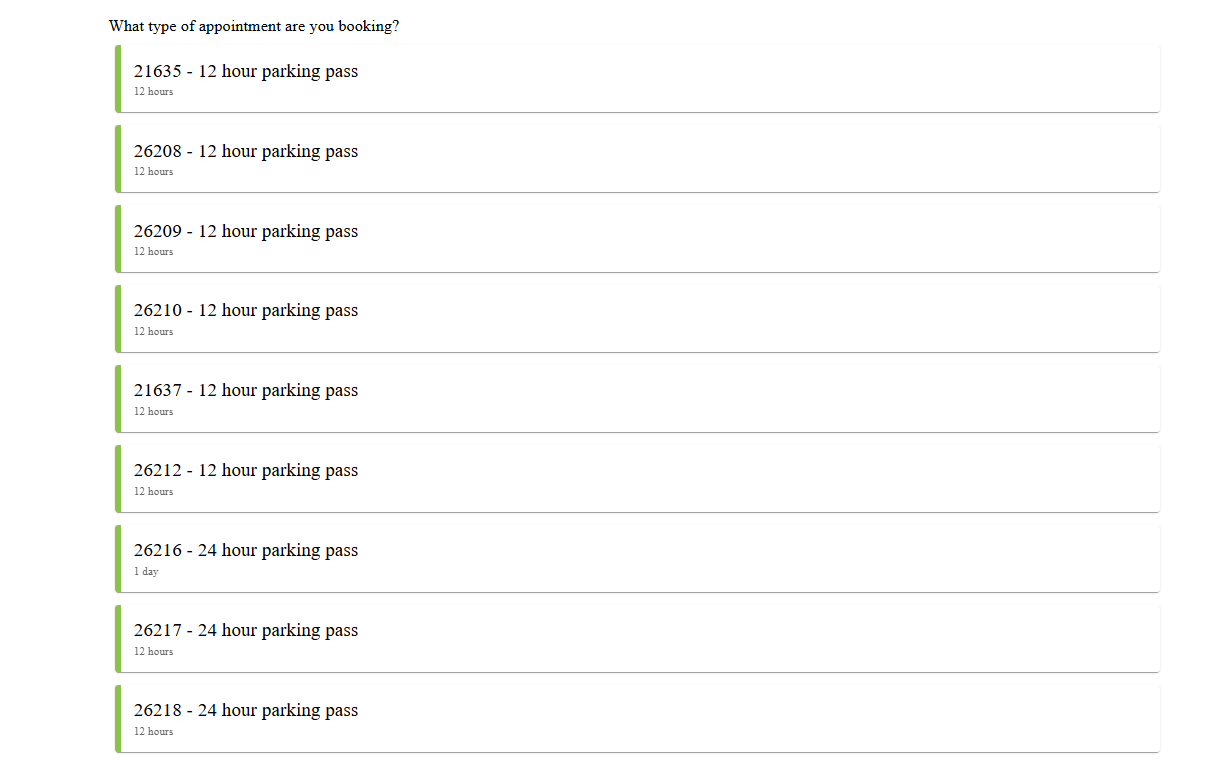
- Click on one of the passes listed. Note that there are 12-hour passes and 24-hour passes listed.
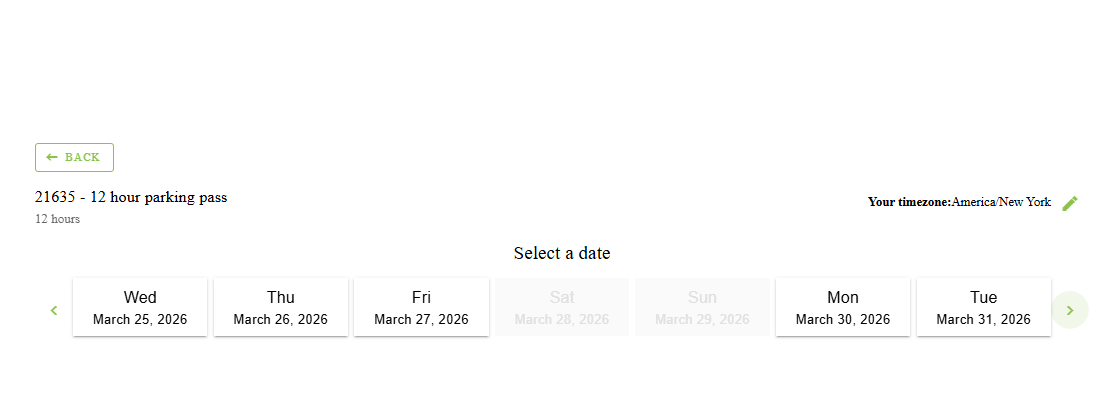
- You will be able to see the availability of each parking pass. Select the date you want to book. You will only be able to select dates that are available to book.
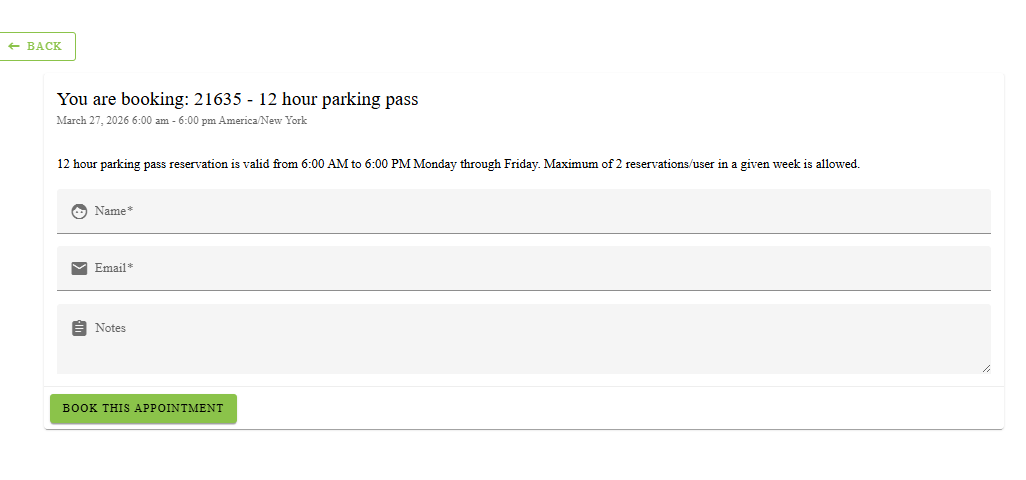
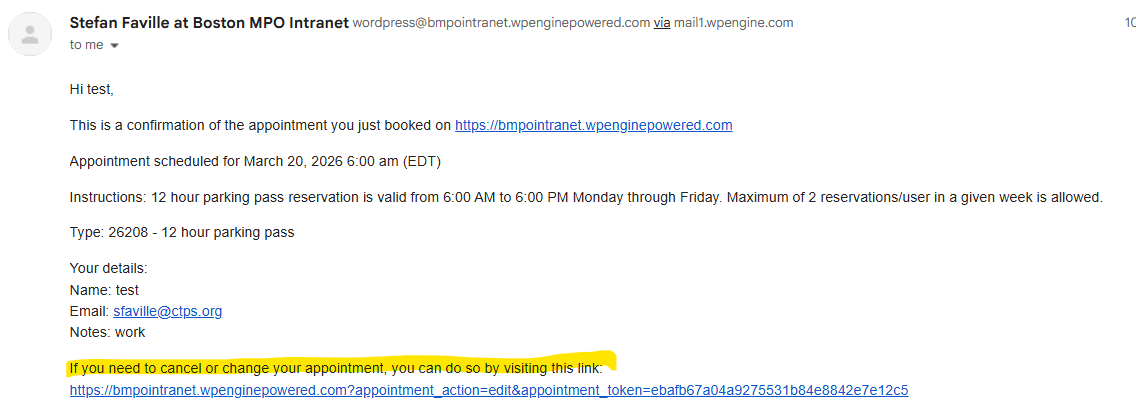
- . Fill out the form with your name, email, and add whether this is for work or personal use in the “Notes” field. Once you select “Book This appointment” you will see a confirmation with the details. You can also add it to your calendar by clicking “Save to Calendar” and “Google calendar”.
- You will also receive an email confirmation with the booking information. There may be a delay due to the spam filters.
How to Cancel a Reservation
- Click on your profile at the top of the page
- Select “View Profile” and then “Your Bookings” to see active reservations
- Click the dropdown menu under “Operations” and select “Delete”
- A pop-up box will appear; confirm the cancellation by clicking “Delete”
- Alternatively, use the cancellation link included in your reservation confirmation email
Learn About Office Closures
There are multiple ways to find out if the office has to be closed for the day or has a delayed opening because of a weather-related emergency or some other type of emergency.
- The governor will announce via the news that nonessential state workers should not report to work that day.
- The Commonwealth will post the same message on its website, mass.gov.
- CTPS will update its outgoing telephone message to indicate the office will be closed. Please keep in mind that in the case of loss of electricity or other technical difficulties, this method of communication may not happen.
If you have scheduled a vacation, sick, or discretionary day for the day on which the closure occurs, you are expected to record your time on your timesheet as scheduled.
Use the Loading Dock
The State Transportation Building (STB) loading dock is located at the rear of the STB. Delivery persons can reach it by taking a right from Charles Street South (northbound) onto Boylston Street and the first (sharp) right off Boylston Street into Edgar Allan Poe Alley. The loading dock is open between 8:00 AM and 4:00 PM. For large deliveries, such as furniture, copiers, etc., please notify the management office to reserve space in advance of the delivery. Normal supply deliveries are first come, first serve.
The loading dock is accessed by the two freight elevators in the service corridor, which is located off of the hallway on which CTPS is located (accessed via a set of swinging double doors, located on the opposite side of the hallway from CTPS, between the entrance to CTPS and the restrooms). The loading dock is on the first floor of the STB.
Please contact a Finance and Operations team member for access to the service/freight elevators.
Find and Use the Showers and Lockers
Showers are available in the State Transportation Building (STB) for the use of employees. There are baskets and lockers in the locker rooms available to rent. Fee details can be obtained from the STB Management Office. Rental of a basket or locker is not required to use the showers. Both the men’s and the women’s facilities are located on the third floor and can be reached through the double doors adjacent to the west elevator bank (CTPS is on the West side of the STB). The facilities are open between 7:00 AM and 7:00 PM, Monday through Friday. The access code for both rooms is available from the STB Management office or CTPS HR. Call the STB management company, at 857-368-9750, to inquire about the facilities and fees.
Find and Use Bicycle Parking
Bicycle racks are provided on the upper-garage level adjacent to elevators #11 and #12. Bicycle access to and egress from the State Transportation Building (STB) by employees is permitted only by way of the garage ramp. Bicycles are to be kept only at the bicycle racks and should be locked to a rack. Leaving bicycles in the public corridors, stairways, or freight elevator lobbies is in violation of fire regulations. Bicycles may not be taken to the Boston Region MPO office.
Bicycle owners are responsible for securing their bikes. The STB management company is not responsible for loss or theft. Bicycles may not be left in the garage overnight. STB management reserves the right to cut locks and remove bicycles that are parked in unauthorized areas, abandoned, or left overnight.
Enter the Office to Work After Hours and On Weekends
Staff must have a State Transportation Building (STB) photo ID available at all times to gain access to any part of the STB (except for the first floor—the retail area—which is open to the public). If arriving at the STB after 6 PM or during the weekend, all employees must sign in at the STB information desk on the second floor.
In addition to the STB ID, all employees are provided an electronic key fob to enter the office during non-business hours. The STB Security officers are not allowed to open the office entrance after hours for anyone under any circumstances.
Respond to Emergencies and Evacuate the Building
NOTIFICATION
If you observe or become aware of a building emergency, dial 911 or call the State Transportation Building (STB) Security Hub, as shown below, and notify the HR and Operations team at [email protected] as soon as feasible. Provide all applicable details, including address, floor, and location. If immediate evacuation is needed, pull the fire alarm and alert other employees and tenants.
| Dial 911 (Emergency Responders) for: | Dial 617-973-7120 (STB Security Hub) for: |
|---|---|
| Fire and/or smoke | Water leak |
| Medical emergency | Power outage |
| Active Threat | Suspicious items/activities/vehicle/mail* |
| Hazardous materials release | Threats and Disruptive Behavior* |
| Other events that immediately affect life safety |
* As appropriate, also dial 911
EVACUATION
Procedure
- Listen to instructions and the fire alarm evacuation message to determine if your floor must be evacuated.
- If time permits, secure all workstations and put away any valuables and sensitive materials.
- Leave the building through the nearest designated “EXIT” or “EMERGENCY EXIT” unless directed elsewhere by a Floor Monitor, security guard, or public safety officer. Placards with evacuation routes may be posted at stairwells and elevators. Elevators may not be available in close proximity to the occupant’s office.
- If possible, hold open the exit door until the area is evacuated.
- Assist persons with disabilities; anyone unable to evacuate should wait by the elevators and call 911.
- Do not carry food, drinks, or other unnecessary belongings.
- Evacuate the building to any designated assembly locations identified below.
- Do not return to an evacuated area for any personal belongings.
- Return to the building only after the “ALL CLEAR” is given by the STB Incident Commander or other authorized responsible official.
ASSEMBLY LOCATIONS
| ASSEMBLY LOCATION | PRIMARY EXIT | SECONDARY EXIT |
|---|---|---|
| Across the street, on the sidewalk in front of W Hotel | Dunkin’ Donuts in Building Lobby | Nearest Chipotle |
| Outside of Boylston Station | Emerson Alley | Dunkin’ Donuts |
| Open space at Charles Street and Park Plaza, across the street from P.F. Chang’s | Nearest Chipotle | Dunkin’ Donuts |
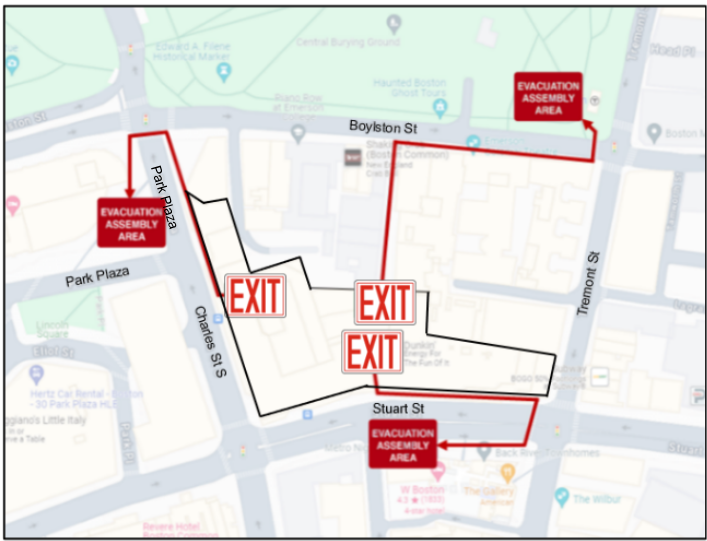
Map showing evacuation points of State Transportation Building
SHELTER IN PLACE
For some emergencies, building occupants may be directed to remain in the building until the danger passes. This may include police activity, severe weather, hazardous environmental conditions, or other threats.
HAZARD PROCEDURES
Fire/Smoke
- If you observe smoke or fire, pull the nearest fire alarm and dial 911.
- Only use a fire extinguisher if you know how and the fire is sufficiently small to safely do so.
- Close doors behind you and follow evacuation procedures.
Active Threat
- Always be familiar with your surroundings and exits.
- In the event of a possible active threat, call 911 when you can do so safely and:
- RUN: Move away from the threat and keep hands visible to arriving police.
- HIDE: If you can’t escape, quietly hide out of view or lock yourself in a room; silence your phone.
- FIGHT: Only as a last resort, attack the assailant by tackling or throwing items; yell to disorient.
Suspicious Activity
- IDENTIFY: Does the person, activity, item, or vehicle look suspicious for some reason?
- VERIFY: If you can, ask around to find out if it is legitimate or known to others.
- TAKE PRECAUTIONS: Stay clear and do not handle the item; clear the surrounding area as needed.
- REPORT: Dial 911 or the STB Security Hub and provide all available information.
HazMat Incident
- For an incident on-site, avoid the area and ensure 911 or the STB Security Hub has been notified.
- For an external incident, you may be asked to evacuate; if you are advised to remain indoors:
- Close doors, windows, and vents as appropriate.
- Seal door and window gaps with cloth, plastic, or tape.
Medical Emergency
- Ensure that 911 is called and then notify the STB Security Hub.
- Do not move the person; if conscious, ask them about their condition and provide reassurance.
- Until responders arrive, render basic CPR/AED/First Aid if you are qualified to do so.
Severe Weather
- Move away from exterior doors and windows; if outside, move inside the building.
Threats and Disruptive Behavior
- Threats may be made in person, by phone, in writing, or online.
- Gather and report all available information to 911 or the STB Security Hub.
Security Policies
- POLICIES: No piggybacking through or propping of secured doors; the use of physical keys where electronic badge access is present is strictly prohibited.
- BADGES: Must be carried at all times and may never be shared; if you don’t have your badge, you must sign in to the building as a visitor until you retrieve it or receive a new one.
- PROHIBITED ITEMS: Weapons, including firearms, are not permitted at any time (excludes law enforcement and authorized/approved Security Personnel).
Please refer to the Security and Emergency Action Plan for additional details on these topics.