Archive a Project
When you complete a project, it is critical that you consolidate and organize all project materials and data so important information will not be lost. Not only do good organization and management help maintain institutional and project memory, they also help us find materials quickly. This page outlines the procedure for archiving project files and distributing CTPS reports electronically.
Topics Covered in this Process
Section 1: When to create an electronic project archive
Section 2: Where to archive final project files electronically
Section 3: How to create the electronic project archive
Section 4: What to archive
Section 5: Moving the final project-archive folder to the Project Archive Drive folder
Section 6: Posting final documents to the MPO website
Section 7: Including project data in CTPS databases
1. When to Create an Electronic Project Archive
In general, the final project archive will contain 1) the final report or memorandum, 2) interim technical memoranda (if any), 3) technical materials, and 4) non-technical and administrative materials. Practices vary, however, depending on whether the project is considered “discrete” or “ongoing.”
1.1 Discrete Project Materials
Discrete projects have specific start and end dates (may or may not coincide with the federal fiscal year). You should create an archive for a discrete project when you submit the final work product to the client (or present it to the MPO). You should archive discrete studies that receive MPO 3C funding during or shortly after the end of the fiscal year in which the project was funded.
1.2 Ongoing Project Materials
Ongoing projects support and continue the 3C transportation planning process from year to year. These projects include the three major MPO documents—the Long-Range Transportation Plan (LRTP), Transportation Improvement Program (TIP), and Unified Planning Work Program (UPWP)—as well as a number of other programs.
1.2.1 Major MPO Documents (TIP, UPWP, and LRTP)
You should create an archive annually for the TIP and UPWP, and every four years for the LRTP, at the end of the federal fiscal year in which the document was approved. Whenever the MPO approves an amendment to any of these documents, you should add it to the existing archive.
1.2.2 Materials Associated with Other Ongoing Projects
You should create specific archives for the following “other” ongoing projects:
- Public Engagement Program
- Performance-Based Planning and Programming (PBPP)
- Community Transportation Access (CTA) Program
- Congestion Management Process (CMP) Program
- Transportation Impact Mitigation (TIM) Program
- Freight Planning Program
- Regional Model Enhancement
- Data Program
- Information Technology Management
- Active Transportation Planning Program
- Multimodal Mobility Infrastructure Program
- Support to the MPO and its 3C Process
- Comprehensive Safety Action Plan
- Technical Assistance
2. Where to Archive Final Project Files Electronically
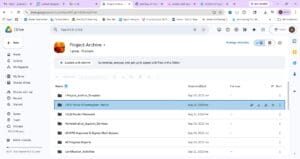
The archive is located in the Google Shared Drive named Project Archives, and contains folders for each group.
Also in the Project Archive directory is a folder called “Project_Archive_Template,” which is populated with a set of empty subfolders to illustrate the file structure recommended in Section 3 below. (This organizational structure is very similar to the one previously recommended for paper project archives.)
A screenshot of the project archive directory is illustrated in Figure 1 below.
Figure: Location and Structure of CTPS Project Archive Directory
3. How to Create the Electronic Project Archive
When you are ready to create the final project archive, you may copy the Project_Archive_Template folder and place it on your own drive.
Rename the top-level project archive folder (Project_Archive_Template) using the following convention:
- Year and month in which project was completed (yyyy-mm)—generally should coincide with date of final progress report
- Project number
- Project name (as it appears in the UPWP, or an easily understood abbreviation, if the UPWP name is very long)
- Example: 2013-07 14322 Early-Morning Transit Service
Documents placed in a project subfolder that have gone through editing should retain the existing Editorial file-naming convention. However, you should change the date to be that on which the document became official (for example, for work programs, memoranda, or reports that go to the MPO, the date in the file name should be the date of the MPO meeting at which the document was presented):
- Date on which the document was completed (yyyy-mm-dd)
- Document name
- Three-letter product-type abbreviation, for example, MEM for memo, REP for report, and so forth
- Author’s initials
- The word “FINAL” to indicate that it is the final edited version of the file
- Example: 2013-06-28 Early-Morning Transit Service MEM JB FINAL
Documents that have not gone through the Editorial process may retain whatever name the author (or outside source) gave them. However, authors are encouraged to adopt a consistent file-naming protocol that is compatible with the one shown above. Using the same file-name structure—consistently and for all files—at the beginning of a project may decrease the time you spend archiving the project at the end. Likewise, using the suggested folder structure (or some variant of it) consistently from the beginning of a project may decrease the time you need to spend at the end.
If some files are not in electronic format, they should be scanned, appropriately named, and placed in the applicable file in the project archive (for example, key correspondence or important data that was only provided as hard copy).
4. What to Archive
Only essential files need to be archived. If you are uncertain about whether certain files are essential or not, please consult with your group manager. Drafts and nonessential files—for example, files that are not associated with the final project outcome or product, or files that contain background information that was helpful to the author—do not need to be included. However, for MPO documents (the LRTP, TIP, and UPWP), any drafts and amendments that go out for public review and/or are voted on by the MPO should be a part of the project archive.
Below is an overview of the folders that are found in the Project_Archive_Template and the kinds of materials that should be filed in each. If some alternative organizational scheme seems to work better for a particular project, then you may use that scheme. For projects that have many files, you may wish to create subfolders with descriptive names to make materials easy to find. For such projects, you may want to include a README file in certain folders. You may also delete folders that you don’t need.
4.1 Top-Level Project Archive Folder
In addition to the subfolders listed below, the top-level folder should include:
- A README file. Typically, a README file contains a very brief description of the project and associated products and data, as well as the contents of the files (and their sources).
- A list of any missing files (theoretically, no essential files should be missing.)
4.2 Administrative and Other Nontechnical Materials
An empty folder has been set up within the “Administrative and Other Nontechnical Materials” folder for each of the topics cited below. When creating the final archive, you may add or delete folders, as necessary.
- Work programs and plans: Include the Word version of the document, a portable document format (PDF) of the exhibits that were generated from the exhibit-builder tool, and a PDF of the final version of the scope.
- For work programs that are approved by the MPO and signed by the MPO Chair, include a scanned version of the signed document. For work programs that are presented to, but not approved by, the MPO (for example, those for most of the ongoing MPO activities projects), there will not be a signed copy.
- For work plans, which are not approved by the MPO, include a scanned version of the copy that was signed by the client for whom the work plan was written.
- Correspondence: You should scan any essential paper documents, for example, public comments, letters, memoranda, attachments, etc. You may include critical emails, saved as PDF files.
- Project committee materials: Meeting notices, agendas, minutes, etc.
- Public process materials: Meeting flyers, newsletters, press releases, legal notices, meeting notes, PowerPoint presentations (FINAL only), etc.
- For MPO documents (and their amendments):
- For public meetings: You should include a list of public meetings at which the document was discussed. Indicate that the materials for these public meetings may be found in the 3C Planning and MPO Support archive for Public Participation Process.
- For MPO meetings: You should include a list of all MPO meetings at which the development or amendment of the document was discussed or voted on. Indicate that the meeting agenda, minutes, and other materials may be found in the 3C Planning and MPO Support archive for MPO meetings.
4.3 Technical Materials
In the “Technical Materials” folder, you will find a folder for each of the following topics:
- Background reports and materials
- Data
- Maps, plans, and profiles
4.4 Technical Memoranda
Include the Word version of the memorandum, along with files of any maps or other graphics that were combined with the Word file. You also should include the complete final PDF.
If you make changes to a memorandum after the project has been completed and archived, add the new version of the memorandum to the “Technical Memoranda” folder as the final memorandum, with the date of the changes in the file name. You should include a README document that explains the circumstances under which the changes to the final memorandum were made.
4.5 Final Report or Document (as distributed to the client, endorsed by the MPO, etc.)
If the report was produced using the CTPS report template, include both the Word version and the PDF version of the full document. If the report was designed and produced by Graphics, you only need the PDF.
If you make changes to a final report after the project has been completed and archived, add the new version of the report to the Final Report folder, with the date of the changes in the file name. As described above, include a README document in the folder explaining the circumstances of the changes.
Approved amendments to MPO documents should be archived in the Final Report folder.
5. Moving the Final Project-Archive Folder to the Project Archive shared Drive
Once you have completed archiving, contact IT to have the archived materials placed in the appropriate project archive folder.
If you need to include additional files (for example, amendments to MPO documents that occur during the federal fiscal year after the archive has been created), you should contact IT to make the changes.
6. Posting Final Documents to the MPO Website
For 3C-funded projects, accessible PDF and HTML versions of the final piece must be given to the CTPS website administrator to post on the Publications page of the MPO website. Reports and memoranda completed under agency contracts sometimes also are posted on the MPO website. You should decide, in consultation with your group manager and director, whether to post these documents. Follow the CTPS Accessible Document Production Process to ensure that all documents are properly formatted prior to posting.
In addition, write a brief description (“abstract”) of the report or study, which will be posted along with the document. Look on the website at examples of other accompanying descriptions to help you write this text, which should be reviewed by Editorial before it is forwarded to the website administrator.
7. Including Project Date in CTPS Databases
At the outset of a project, you should have determined, in consultation with Data Management, whether any existing CTPS/Boston Region MPO databases would be enhanced by data collected/analyzed in the course of the project, or whether the data warrants creation of a new database. If so, you and Data Management should have agreed on the best collection and storage methods for the data, for easy incorporation into the appropriate database later on.
When a project has been completed, you should provide the data to Data Management (or a representative of IT) to place in the appropriate database and/or on the website.
Examples of this type of data include:
- License plate surveys
- Parking lot counts (number and use)
- Pedestrian counts
- Pedestrian signal location
- Surveys of any sort
- Traffic counts
- Transit passenger counts
- Traffic signal location
- Transit vehicle on-time arrival and travel time checks
- Travel time estimates
- Vehicle classification counts
- Vehicle occupancy counts